Studio and kits: set up your site, flow, brand and marketplace at once
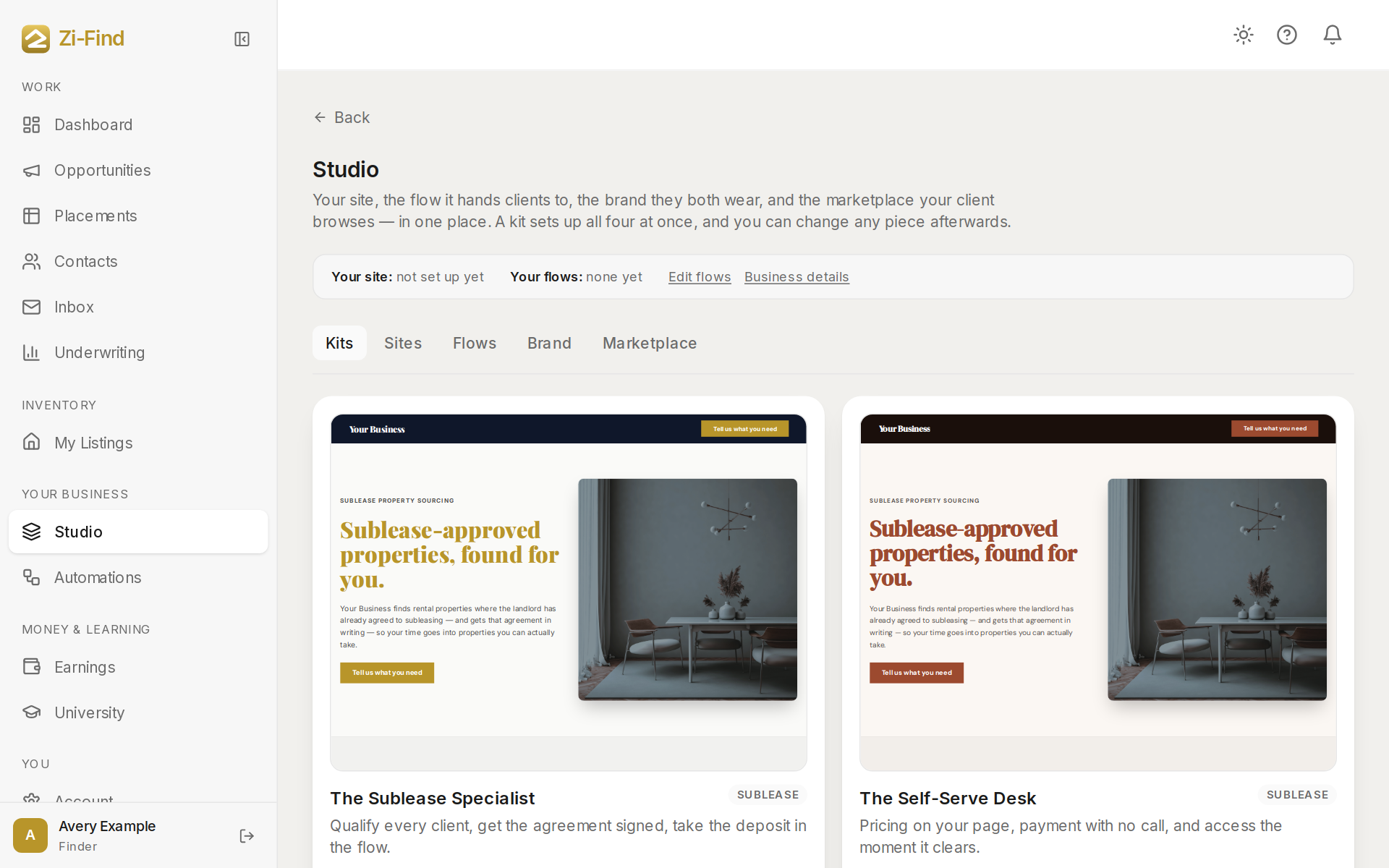
Studio is one place for the four things your clients see: your site, the flow it hands clients to, the brand both of them wear, and the marketplace your clients browse. A kit sets up all four at once. You can change any piece afterwards.
Open Studio
Click Studio in the sidebar, under Your business. Studio is part of Finder Pro+. The top strip shows the state of Your site and Your flows, with links to Edit flows and Business details.
Studio has five tabs:
- Kits — complete starting setups.
- Sites — your logo, whether your site is published, and your domain.
- Flows — flow templates, plus a link to Your agreements.
- Brand — colours and fonts, with presets to start from.
- Marketplace — what your paying clients see, and the properties you pick for each client.
Use a kit
There are two kits today:
- The Sublease Specialist — qualify every client, get the agreement signed, take the deposit in the flow.
- The Self-Serve Desk — pricing on your page, payment with no call, and access to your client marketplace the moment it clears.
To use one:
- On the Kits tab, look over the preview of each kit.
- Click Use this kit. A confirmation lists exactly what will change before anything is saved.
- Click Apply.
What a kit will and won't do
A kit seeds drafts. It never locks you in and never publishes on a guess.
- No site yet? It creates your site as a draft. Nobody can see it until you press Publish on the Sites tab.
- Already have a site? Your page wording is kept.
- Flows: it adds the kit's flow as a draft. You add your price and wording before it goes live. If you already have a flow from that template, it's left exactly as it is.
- Brand: it sets your site's colours and fonts from the kit. If your site is already published, the new colours show straight away.
Each flow template lists what You fill in (for example, your price or your booking link). Those are the parts only you can supply, so a seeded flow can't be published until you complete them.
Use one piece at a time
You don't have to use a whole kit. On Flows you can Use this flow on a single template, and on Brand you can Use a single preset (Signature Gold, Deep Green, Oxford Navy, Burnt Clay or Graphite).
The flow templates are:
- Qualify → Agreement → Deposit — they tell you what they need, sign your agreement and pay inside the flow.
- Direct to cart — pricing on your site, payment, and marketplace access the moment it clears.
- Vendor listing — cleaners and other service pros pay you monthly to be listed for your clients.
- Straight to a call — one question, then they book a time through your booking link.
- Market request intake — they say what they're after and you follow up. No money at this stage.
Good to know
- The site design is written as your own service page and filled in with your business name. It doesn't mention Zi-Find, and it doesn't state numbers or prices you haven't set.
- Edit a flow's steps under Edit flows. See Build your client flow.
- Publishing is always your act: Publish on the Sites tab for your site, and publish in the flow editor for each flow.
Need more help?
Customers get support inside their account. Sign in, then open Help or the chat bubble in the corner.