What Finder Pro+ includes, and who it's for
Finder Pro+ is the Zi-Find plan for finders who want to run a property-finding business under their own name. It costs $297/month and adds a full set of white-label tools on top of everything in Finder Pro ($97/month): your own site, client intake flows, a client CRM, an email inbox, a placements board and automatic client emails.
A "finder" is someone who sources sublease-approved properties: rentals where the owner has agreed in writing that the tenant may sublease (for short-term, mid-term or co-hosting use). On Pro+ you do that work for your own clients, under your own brand.
Who Pro+ is for
- Finders who sell a property-sourcing service to their own clients (rental operators looking for approved units) and want one place to run it.
- Finders who want clients to see their brand, their address and their email — not Zi-Find's.
- Anyone who has outgrown a spreadsheet, a separate email account and a booking link stitched together.
If you only want to list properties you find and talk to operators on the Zi-Find marketplace, Finder Pro is enough. See Free vs Finder Pro.
What you get on Pro+
Everything in Finder Pro, and:
- Unlimited listings on the marketplace (Finder Pro is capped).
- Unlimited operator demand — work every operator request, not a limited view.
- Promotion of your finds across the Zi-Find homepage, newsletter and social, shown on the Amplification tab of My Listings.
- A week of live finder training.
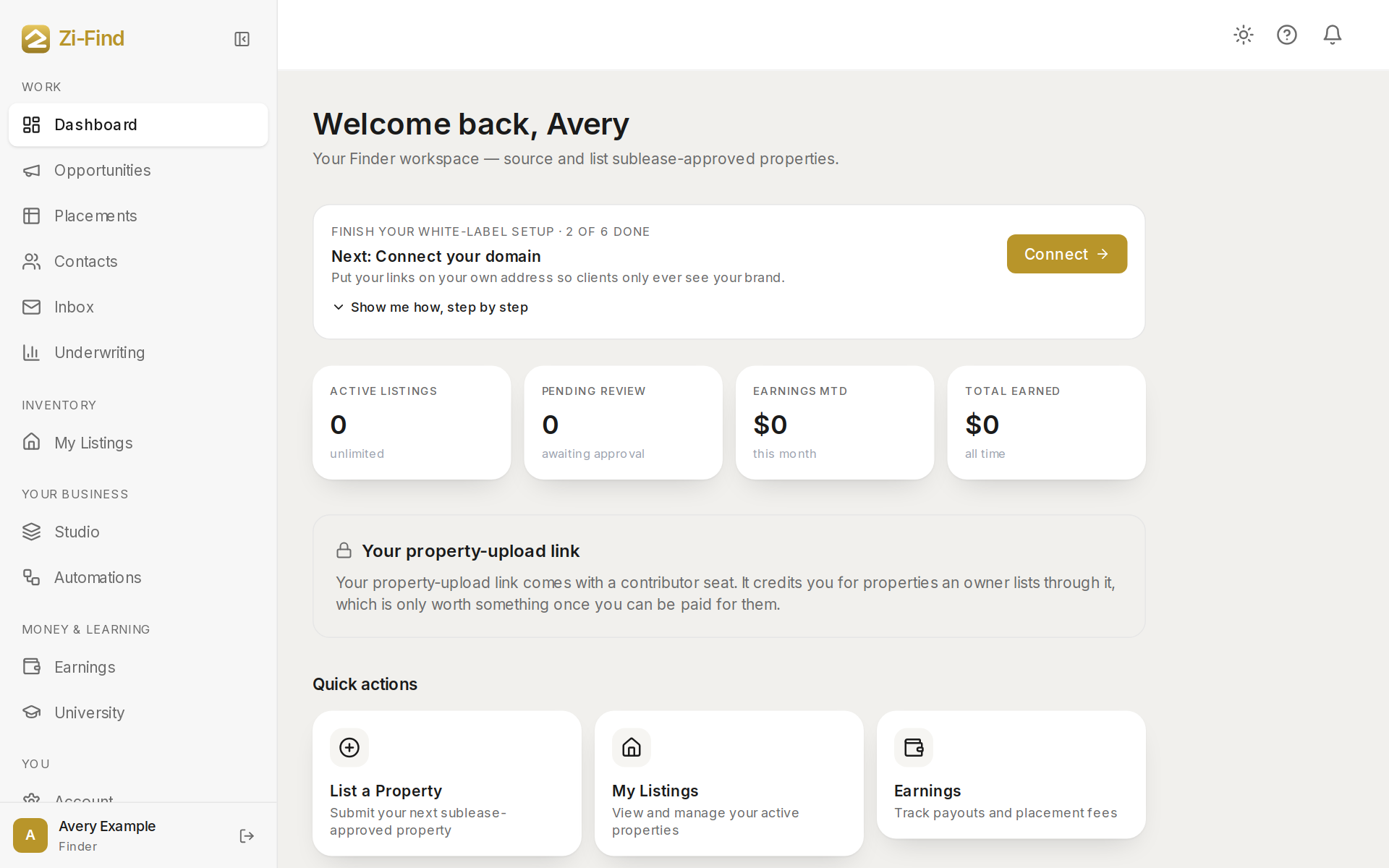
And the white-label tools, which appear in your sidebar:
- Studio — kits that set up your site, client flow, brand and client marketplace in one go. See Studio and kits.
- Placements — a board with every client and property from first request to signed lease. See The placements board.
- Contacts — one record per client or owner, with a full timeline.
- Inbox — email your clients from your own address; replies come back into the thread.
- Underwriting — comps, market numbers and a 12-month projection for any address.
- Automations — the emails your clients get at each step, sent from your address.
- Account → Integrations — connect your own email sending (Resend) and your own Stripe so clients pay you directly.
How the sidebar is organised on Pro+
Your sidebar is grouped by what you're doing:
- Work — Dashboard, Opportunities, Placements, Contacts, Inbox, Underwriting.
- Inventory — My Listings (with List a property and Amplification inside it).
- Your business — Studio and Automations.
- Money & learning — Earnings and University (if you have courses).
- You — Account, which on Pro+ is your settings hub: Account, Brand and Integrations.
On a phone, the bottom bar shows Dashboard, Placements and Inbox, and everything else is under More.
Good to know
- Zi-Find is a marketplace, not a brokerage. Your $297 is a flat subscription. Zi-Find takes no cut of what your clients pay you, and that money never passes through Zi-Find.
- Your clients only ever hear from your own email address. Until you connect your email, client emails are held. See Connect your own email.
- Pro+ does not include board contributions paid by Zi-Find. Those belong to the Finder Program. Pro+ works every operator-funded lane: bounties and operator demand.
- If you are on the older $97 Pro+ plan, the white-label tools come with the current $297 Pro+ plan.
How do I upgrade?
Sign in, open Account, then Billing, or pick Finder Pro+ on the pricing page. New to Zi-Find? Book a call at zi-find.com/contact.
Where do I start after upgrading?
Work through the setup checklist on your Account page. See Set up your white-label business.
Need more help?
Customers get support inside their account. Sign in, then open Help or the chat bubble in the corner.